Deliverable 2 · Before
The current headband manual, annotated
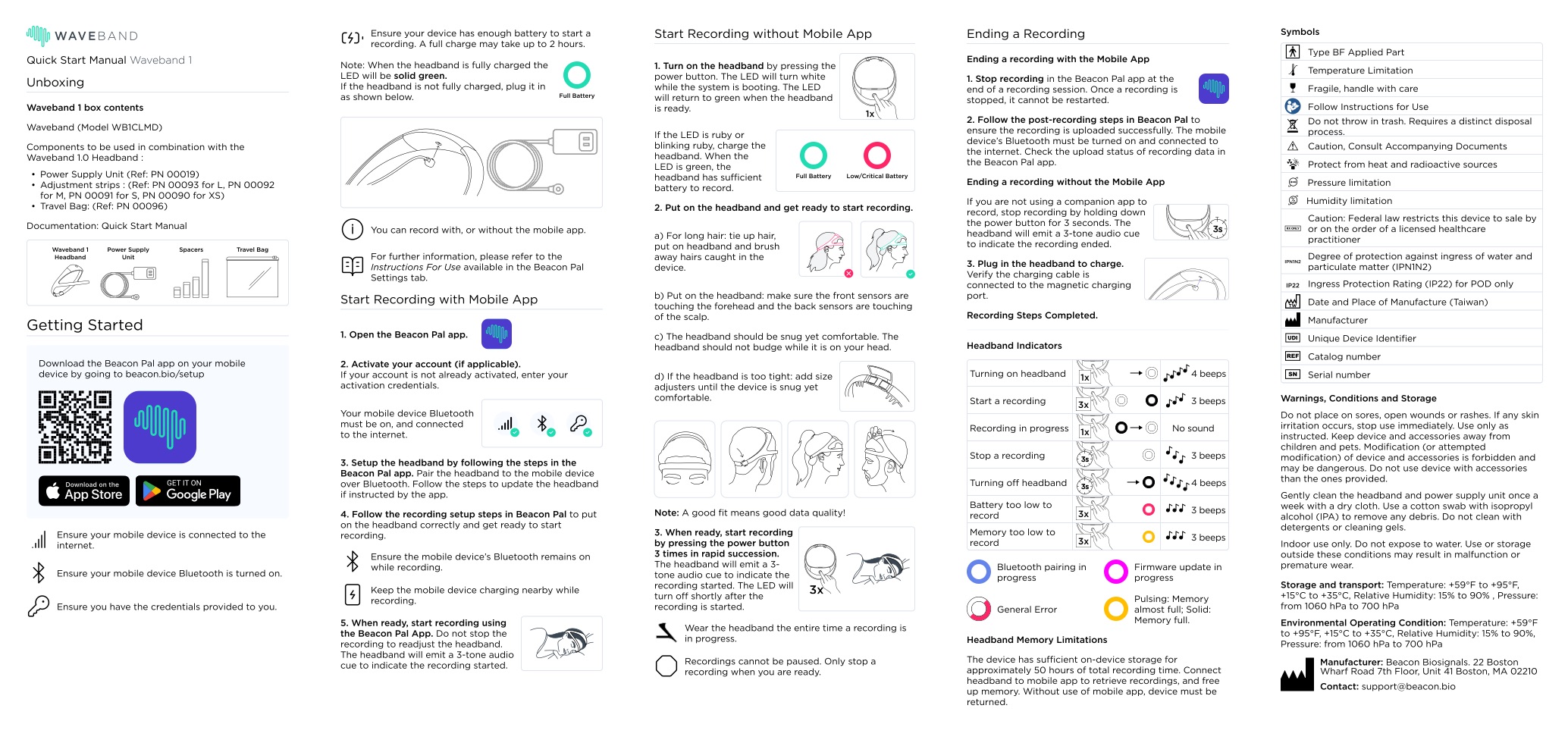
The Waveband 1 Quick Start Manual (Rev 4.0) is one sheet with five panels. It serves a patient, a study coordinator, and a regulator at the same time, and it covers one of the two devices in the kit.
Source: beacon.bio, Waveband 1 Quick Start Manual Rev 4.0, page 1 of 2. Shown for critique. The concept keeps all regulatory content and only moves it. See the after →
- 1
Part numbers sit in the patient's first step
The unboxing list reads "Adjustment strips : (Ref: PN 00093 for L, PN 00092 for M, PN 00091 for S, PN 00090 for XS)". A patient needs to know what the part does, not its catalog number.
After: a picture strip names eight parts with one word each. Part numbers move to the instructions for use.
- 2
One part has three names
The same sizing part is "Adjustment strips" in the list, "Spacers" in the picture, and "size adjusters" in step 2d. A patient can reasonably think these are three different parts.
After: "size pad", everywhere.
- 3
Two ways to start, side by side
"Start Recording with Mobile App" and "Start Recording without Mobile App" run in parallel columns. The button-only path has no signal check, and the LED turns off once recording starts.
After: one path, through the app, ending in a single green GO.
- 4
The battery light means opposite things in two languages
English: "If the LED is ruby or blinking ruby, charge the headband." Spanish, page 2: "Si el LED está rubí … significa que se está cargando la diadema" ("it means the headband is charging"). "Ruby" is also not a color most patients name.
After: "Red: charge it first." The Spanish card is translated from the new English card and checked back.
- 5
The most costly rule is at the bottom of panel 3
"Recordings cannot be paused. Only stop a recording when you are ready." A patient who stops to fix the fit loses the night.
After: step 5 says it in red: "If you get up, keep everything on."
- 6
Eleven indicator states and at least five light colors
White, green, ruby, yellow, blue, and magenta lights, plus 1x, 3x, and 3-second button presses and several beep patterns. The chest monitor in the same kit uses a different system: green, amber, and red sensor lights, and a circling pattern in the morning (SleepView instructions).
After: one rule for both devices and the phone. Green means go, amber means fix it, red means stop.
- 7
Regulatory symbols take a full panel
Fifteen symbols, storage pressure limits, and a "radioactive sources" warning share the sheet with bedtime steps. These must stay with the device. They do not need to sit on the nightstand.
After: unchanged content, moved to the instructions for use and the device label.
- 8
Help is an email address
The only contact is "support@beacon.bio". The SleepView phone line is open Monday to Friday, 8am to 8pm Eastern (source), which closes at 5pm for a patient in Fresno. Snap advertises 24/7 phone support (source), so the patient's experience depends on which channel she finds.
After: one phone number in bold, routed to one team with 24/7 coverage. Assumption This needs an operations decision.
Also missing: the sheet never mentions the chest monitor, the second device in the kit. Page 2 repeats the full page in Spanish.